
自动扫描当前文件夹及子文件夹jpg,png图片并压缩
使用智能有损压缩技术将您的WebP, PNG and JPEG图片的文件大小降低。 通过选择性的减少图片中的颜色,只需要很少的字节数就能保存数据。 对视觉的影响几乎不可见,但是在文件大小上有非常大的差别。
- 自动扫描文件夹:
- 如果用户直接回车(不输入路径),程序会递归扫描 当前文件夹 及其 所有子文件夹,查找
.jpg、.jpeg、.png文件。 - 显示找到的图片列表,并允许用户选择 覆盖模式 或 另存为模式。
- 如果用户直接回车(不输入路径),程序会递归扫描 当前文件夹 及其 所有子文件夹,查找
- 批量压缩:
- 如果选择 覆盖模式,所有图片会被原地压缩(直接修改原文件)。
- 如果选择 另存为模式,所有图片会被保存到用户指定的路径(需确保路径合法)。
- 更友好的交互:
- 显示扫描到的图片数量及路径,方便用户确认。
- 仍然支持单文件压缩(如果用户输入具体路径)。
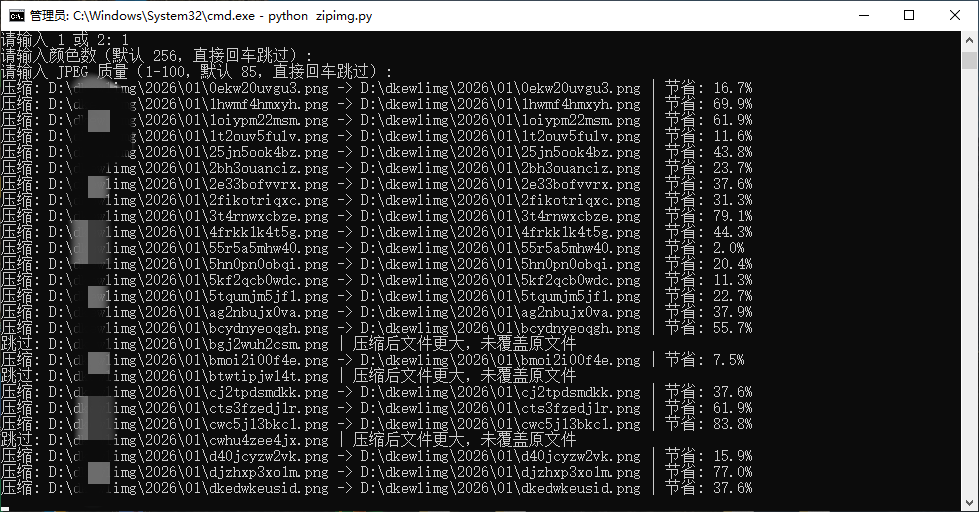
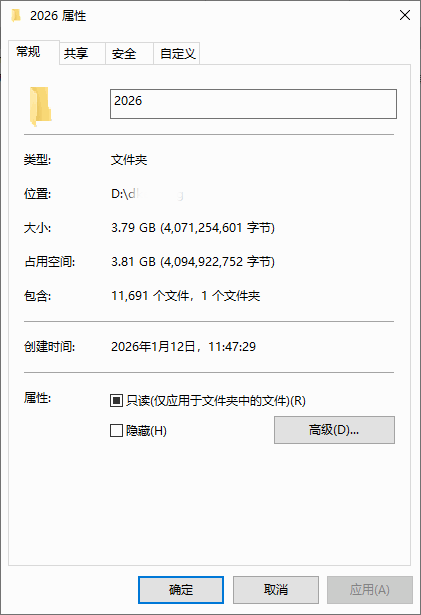
压缩后:2G

压缩前3.8G
import os
import io
from PIL import Image

def compress_image(input_path, output_path=None, colors=256, quality=85, cover=False):
    """
    压缩图片,支持覆盖源文件(cover=True)或输出到新文件(cover=False)

    Args:
        input_path (str): 输入图片路径
        output_path (str, optional): 输出图片路径(如果 cover=False)
        colors (int): 量化颜色数(默认 256)
        quality (int): JPEG 质量(1-100,默认 85)
        cover (bool): 是否覆盖源文件(默认 False)
    """
    try:
        # 1. 检查输入文件是否存在
        if not os.path.exists(input_path):
            raise FileNotFoundError(f"文件不存在: {input_path}")

        # 2. 确定输出路径
        if cover:
            output_path = input_path  # 直接覆盖源文件
        else:
            if output_path is None:
                # 默认在原路径下生成 _compressed.jpeg
                base, ext = os.path.splitext(input_path)
                output_path = f"{base}_compressed{ext}"

        # 3. 尝试打开图片
        try:
            img = Image.open(input_path)
            img.load()  # 确保图片数据加载
        except Exception as e:
            raise RuntimeError(f"无法加载图片 {input_path}: {str(e)}")

        original_size = os.path.getsize(input_path)

        # 4. 处理特殊模式(CMYK、16位、黑白等)
        if img.mode in ('CMYK', 'I', '1'):
            img = img.convert('RGB')
        elif img.mode == 'P':  # 处理调色板模式
            img = img.convert('RGB')

        # 5. 处理透明通道(PNG/GIF)
        alpha = None
        if img.mode in ('RGBA', 'LA') or (img.mode == 'P' and 'transparency' in img.info):
            alpha = img.convert('RGBA').split()[-1]

        # 6. 量化颜色
        try:
            # 先确保是RGB模式再量化
            rgb_img = img.convert('RGB')
            quantized_img = rgb_img.quantize(colors=colors, method=2)
        except Exception as e:
            raise RuntimeError(f"量化失败 {input_path}: {str(e)}")

        # 7. 恢复透明通道(如果有)
        if alpha is not None:
            quantized_img = quantized_img.convert('RGBA')
            quantized_img.putalpha(alpha)

        # 8. 尝试保存到内存缓冲区
        output_buffer = io.BytesIO()
        try:
            ext = os.path.splitext(output_path)[1].lower()
            # 确保图片是正确的模式再保存
            save_img = quantized_img
            if ext in ('.jpg', '.jpeg'):
                if save_img.mode != 'RGB':
                    save_img = save_img.convert('RGB')
                save_img.save(output_buffer, format='JPEG', quality=quality, optimize=True)
            elif ext == '.png':
                save_img.save(output_buffer, format='PNG', optimize=True, compress_level=9)
            else:
                save_img.save(output_buffer, format='PNG')  # 默认保存为PNG
        except Exception as e:
            raise RuntimeError(f"保存失败 {input_path}: {str(e)}")

        # 9. 检查压缩后大小
        compressed_size = output_buffer.tell()
        if compressed_size < original_size:
            # 写入输出文件
            with open(output_path, 'wb') as f:
                f.write(output_buffer.getvalue())
            savings = (original_size - compressed_size) / original_size * 100
            print(f"压缩: {input_path} -> {output_path} | 节省: {savings:.1f}%")
        else:
            if cover:
                print(f"跳过: {input_path} | 压缩后文件更大,未覆盖原文件")
            else:
                print(f"跳过: {input_path} -> {output_path} | 压缩后文件更大,已保留原文件")

    except Exception as e:
        print(f"处理 {input_path} 时出错: {str(e)}")
def get_output_path_from_user():
    """交互式获取输出路径,并检查是否有效"""
    while True:
        output_path = input("请输入输出文件路径(例如:output.jpg): ").strip()
        if not output_path:
            print("错误:路径不能为空!")
            continue

        # 检查父目录是否存在(如果路径包含目录)
        parent_dir = os.path.dirname(output_path)
        if parent_dir and not os.path.exists(parent_dir):
            print(f"错误:目录不存在,请检查路径: {parent_dir}")
            continue

        # 检查扩展名是否合法
        ext = os.path.splitext(output_path)[1].lower()
        if ext not in ('.jpg', '.jpeg', '.png'):
            print("错误:仅支持 .jpg/.jpeg/.png 格式!")
            continue

        return output_path

def find_images_in_directory(root_dir):
    """递归查找当前文件夹及子文件夹下的所有图片"""
    supported_extensions = ('.jpg', '.jpeg', '.png')
    image_files = []

    for root, _, files in os.walk(root_dir):
        for file in files:
            if file.lower().endswith(supported_extensions):
                image_files.append(os.path.join(root, file))

    return image_files

def main():
    input_path = input("请输入要压缩的图片路径(直接回车扫描当前文件夹): ").strip()

    if not input_path:
        # 如果用户直接回车,扫描当前文件夹及子文件夹
        current_dir = os.getcwd()
        print(f"正在扫描当前文件夹及子文件夹: {current_dir}")
        image_files = find_images_in_directory(current_dir)

        if not image_files:
            print("未找到任何图片文件(支持 .jpg/.jpeg/.png)!")
            return

        print(f"找到 {len(image_files)} 张图片:")
        for idx, file in enumerate(image_files, 1):
            print(f"{idx}. {file}")

        print("n请选择压缩模式:")
        print("1. 覆盖模式(直接修改原文件)")
        print("2. 另存为模式(保存到新文件)")

        while True:
            choice = input("请输入 1 或 2: ").strip()
            if choice == '1':
                cover = True
                output_path = None
                break
            elif choice == '2':
                cover = False
                output_path = get_output_path_from_user()
                break
            else:
                print("错误:请输入 1 或 2!")

        # 可选:调整压缩参数
        colors = input("请输入颜色数(默认 256,直接回车跳过): ").strip()
        colors = int(colors) if colors else 256

        quality = input("请输入 JPEG 质量(1-100,默认 85,直接回车跳过): ").strip()
        quality = int(quality) if quality else 85

        # 批量压缩所有图片
        for file in image_files:
            compress_image(
                input_path=file,
                output_path=output_path if not cover else None,
                colors=colors,
                quality=quality,
                cover=cover
            )
    else:
        # 单文件压缩模式
        if not os.path.exists(input_path):
            print("错误:文件不存在!")
            return

        print("n请选择压缩模式:")
        print("1. 覆盖模式(直接修改原文件)")
        print("2. 另存为模式(保存到新文件)")

        while True:
            choice = input("请输入 1 或 2: ").strip()
            if choice == '1':
                cover = True
                output_path = None
                break
            elif choice == '2':
                cover = False
                output_path = get_output_path_from_user()
                break
            else:
                print("错误:请输入 1 或 2!")

        # 可选:调整压缩参数
        colors = input("请输入颜色数(默认 256,直接回车跳过): ").strip()
        colors = int(colors) if colors else 256

        quality = input("请输入 JPEG 质量(1-100,默认 85,直接回车跳过): ").strip()
        quality = int(quality) if quality else 85

        compress_image(
            input_path=input_path,
            output_path=output_path,
            colors=colors,
            quality=quality,
            cover=cover
        )

if __name__ == "__main__":
    main()
1. 本站所有资源来源于用户上传和网络,如有侵权请邮件联系站长!
2. 分享目的仅供大家学习和交流,您必须在下载后24小时内删除!
3. 不得使用于非法商业用途,不得违反国家法律。否则后果自负!
4. 本站提供的源码、模板、插件等等其他资源,都不包含技术服务请大家谅解!
5. 如有链接无法下载、失效或广告,请联系管理员处理!
6. 本站资源售价只是赞助,收取费用仅维持本站的日常运营所需!
7. 如遇到加密压缩包,请使用WINRAR解压,如遇到无法解压的请联系管理员!
8. 精力有限,不少源码未能详细测试(解密),不能分辨部分源码是病毒还是误报,所以没有进行任何修改,大家使用前请进行甄别
TP源码网 » 自动扫描当前文件夹及子文件夹jpg,png图片并压缩
TP源码网 » 自动扫描当前文件夹及子文件夹jpg,png图片并压缩